The SEO Audit: How to Run One, What's In It, and How to Deliver Findings That Actually Get Implemented
A practical SEO audit framework. The performance review, technical audit, and content audit components, the tools, the deliverable formats that produce action versus the ones that produce nothing, and the strategic call about whether to run audits free or paid.
Ahh the SEO audit.
This interesting document that outlines everything wrong with a website with respect to SEO. It’s the most important step in actually fixing a site, because it’s where the technical and content limitations get surfaced, prioritized, and turned into a plan.
Combine the audit with the client’s goals (rankings, traffic, conversions, whatever they’re actually after) and you have a real proposal for how to get there.
A lot of people struggle with the audit process from both an execution and a delivery standpoint. On top of that, figuring out where it fits into your service offering can be a challenge. Is it free, used to convert clients? Is it part of the on-page SEO process once a client has signed on? Is it a billable standalone product?
Whatever you decide on the business side, the analysis itself and the audit document have to be top-quality. This guide covers what should be in your audit, what areas to focus on while running it, and how to deliver it so it actually produces implemented changes.
I first wrote this up around 2016 and I’ve kept it updated as the toolset and Google’s signals have evolved. The bones of the framework haven’t moved much. The specifics, in a few places, have.
What an SEO audit actually does
An audit answers four questions:
- Where does the site stand in organic search today?
- What’s preventing it from ranking better?
- Which fixes will move the needle most?
- In what order should the work happen?
The output isn’t a list of every issue. It’s a prioritized roadmap that maps findings to actions, with rough effort and impact estimates. A 40-page audit document a client can’t act on is worth less than a 10-page audit that ships work.
Time investment ranges from an hour to a full day depending on the depth of the audit and the size of the site. Free prospecting audits skew lighter. Paid audits or pre-engagement diagnostics for substantial campaigns warrant the full day.
Three audit components
A complete audit has three sections. Skip any of them and the picture is incomplete.
1. Performance review
The snapshot of where the site stands today. This is the baseline against which everything else is measured.
What to pull:
- Organic traffic. Month-over-month, year-over-year, percentage of total site traffic. Trend matters as much as absolute numbers.
- Top landing pages. Which pages currently get organic traffic. Is it diversified across content, or is it all going to the homepage like most small business websites? Is there conversion tracking? These observations spark the right client conversations later.
- Current keyword rankings. Some quick keyword research up front (don’t spend a ton of time here) to see where the site shows up. Mix in higher-volume head terms, competitive geo-modifiers, and long-tail queries. Include the keyword difficulty alongside so the client understands that some of those rankings are much harder than others, and the plan and budget have to reflect that.
- Domain authority signals. Moz Domain Authority and Page Authority, Majestic Trust Flow and Citation Flow, do-follow versus no-follow root linking domain split. Don’t just dump the metrics. Explain what each one means and what it implies for the specific situation. Comparing them to the top competitors (when you know them) adds significant value over the raw numbers alone.
- Link profile health. Total links, anchor text distribution, types of links pointing in, any high-risk links worth disavowing, any obvious gaps in the kinds of links the profile should have but doesn’t.
Tools used:
- Google Analytics 4 for traffic and conversion data (where you have access)
- Google Search Console for query, page, and impression data
- Ahrefs, SEMrush, or Moz for keyword rankings and link profile
- Majestic for trust flow and link profile depth
The performance review is the easiest section to compile and the highest-value section for the client. It tells them where they are.
2. Technical SEO audit
The diagnostic on whether the site can be properly crawled, indexed, and rendered. Issues in this section often produce dramatic improvements when fixed.
Robots.txt. Head over to yoursite.com/robots.txt and look for anything unusual that’s blocked but shouldn’t be. A standard WordPress robots.txt should look like:
User-agent: *
Disallow: /wp-admin/
Allow: /wp-admin/admin-ajax.php
The classic failure: a staging-environment robots.txt accidentally promoted to production with Disallow: / blocking everything.
XML sitemaps. Does the site have one, is it submitted to Search Console, and does it include the right URLs (live pages only, not redirects, not no-indexed pages, not 404s)? An auto-generated and submitted sitemap is usually fine. Manual ones tend to have formatting issues and incorrect priority specs.
Indexation. Compare the URLs in the sitemap to the URLs Google has actually indexed. If the sitemap has 100 pages and Google only indexed 30, that’s a real problem worth chasing. Common causes: post types or sections set to no-index but still in the sitemap, duplicate content collapsing, thin content getting filtered.
I’ve worked with a client that had multiple brands selling the same products, and all of their sites had copy-and-paste content across them. Pages got de-indexed in droves. The audit needs to flag this kind of pattern when it shows up.
Page speed and Core Web Vitals. LCP, INP, and CLS for major page templates. Page speed is a ranking factor in its own right, and it’s a major conversion factor. The conversion-rate hit per second of additional load time is real, somewhere in the range of a few percentage points per second depending on the source you trust. Google wants to return results that provide the best user experience, and how quickly a page loads is a real part of that.
PageSpeed Insights is the canonical tool. SEO consultants should be intimately familiar with it and what to act on. GTmetrix and WebPageTest also help, with different rendering of the same general data.
404 errors and redirect chains. Broken links lose link equity. Long redirect chains slow the site and waste crawl budget. Search Console’s coverage report is the easiest path when you have access. Otherwise, run Screaming Frog and sort by status code in both internal and external link views.
URL structure. Is the URL hierarchy reflecting the content hierarchy? Are URLs clean and descriptive? Any URL parameter problems creating duplicate content?
URL structure and internal linking is one of the most important on-page factors that most run-of-the-mill SEOs completely miss. We covered the siloing approach in detail in our on-page SEO guide.
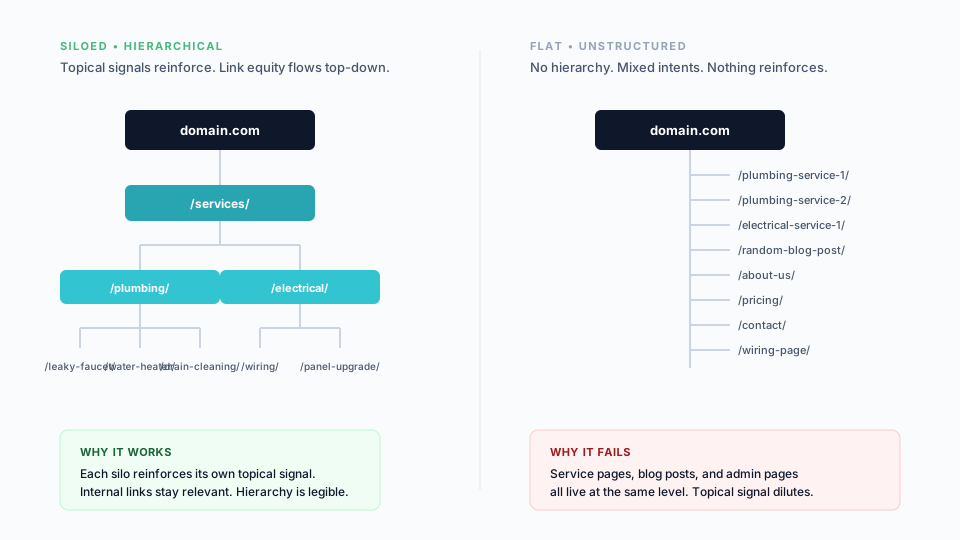
Internal linking. Does the site have meaningful internal links within content? Is there a breadcrumb system? Are content silos linking within their sections properly? Most of this you can spot manually, but Screaming Frog will surface orphan pages and weak link equity flow.
Mobile experience. Pass/fail on Google’s Mobile-Friendly Test, plus a manual review of key page templates on mobile. Most sites pass the auto-test. The user experience review is a separate exercise and arguably outside the scope of a standard audit, but worth a glance.
HTTPS and security. Active SSL certificate, no mixed-content warnings, proper HTTP-to-HTTPS redirects. This was a bigger flag in the early days of HTTPS adoption. In 2026 it’s mostly a hygiene check, but the few sites that still don’t have it should fix it immediately.
Schema markup. What schema is present, what should be present, and validation results from Google’s Rich Results Test. The biggest wins still come from LocalBusiness, FAQ, HowTo, Product, Review, and Organization or Person schema for E-E-A-T signal building.
Canonical tags. Present, correct, pointing where they should? A misconfigured canonical tag can quietly tank rankings while the rest of the site looks fine.
Tools:
- Screaming Frog or Sitebulb for the full crawl
- Google Search Console for indexation, mobile, and Core Web Vitals data
- PageSpeed Insights, GTmetrix, or WebPageTest for speed details
- Rich Results Test for schema validation
- Mobile-Friendly Test for the mobile pass/fail
The technical audit is where the unsexy but high-impact wins live. Fixing a robots.txt issue or a botched canonical setup can produce ranking lifts that link-building campaigns can’t.
3. Content audit
The on-page and content-strategy diagnostic. This is where the most labor-intensive findings live, and where the recommendations have the longest implementation timelines.
Page titles. Keyword inclusion, length within character limits, uniqueness across pages, template bloat. Sites where every title ends with the same 30-character brand suffix are wasting prime title-tag real estate.
For example, if our head keyword for this page is “SEO audit,” a well-optimized title might be:
The SEO Audit: How to Run One, What’s In It, and How to Deliver Findings
A default WordPress-style template title would be:
SEO Audit | Brand Name
That follows the “Page Name | Brand Name” convention that’s the default for WordPress and many CMSes. It’s not wrong, but it’s wasted space on smaller business sites where the brand isn’t already a search trigger.
The audit’s job here isn’t to fix every page title. It’s to identify the duplicate titles and the optimization opportunities, and to recommend the priorities.
Meta descriptions. Meta keywords are dead. Stop using them. Now that that’s out of the way, the meta description still matters indirectly. It’s not a ranking signal, but it impacts click-through from the SERPs, and click-through is a ranking signal. Plus matching the description to the body copy reduces bounce rate.
The crawl data will tell you whether meta descriptions exist, are duplicated, or have room to be better optimized.
Heading hierarchy. Single H1 per page, sensible H2 and H3 structure, keyword variations placed appropriately, no header skipping (H1 → H4 → H2 confuses both screen readers and crawlers).
Body content quality. Word count adequacy for the topic, content depth, original writing versus boilerplate or scraped content.
Duplicate content. Across pages on the same site, between subdomains, or copied from other sites. Some duplicate content isn’t a real problem if it’s handled well (no-index, canonical). The threats worth flagging are the unhandled ones. Screaming Frog and Sitebulb both surface duplicated titles and metas. For body copy, Copyscape catches cross-site duplication.
Thin content. Pages with insufficient depth to rank. Tag pages, archive pages, near-empty service pages. On a small scale, no issue. On a large scale, real ranking liability.
Rich media. Images, videos, audio. Are images using proper title and alt tags? Is there enough rich media on key pages? On smaller sites, score this on a scale rather than scrutinizing every image. Unless of course it’s a paid audit and you have the time to really dig deep.
Content strategy gaps. Coverage gaps (queries the site should rank for but has no relevant page), cannibalization (multiple pages targeting the same query), outdated content with stale information, missing internal links between topically related pages.
Tools:
- Screaming Frog for on-page element extraction
- Sitebulb for visual analysis and clustering
- Copyscape for duplication detection
- Google Search Console for query and page performance data
The audit deliverable
The audit is only as good as how it’s delivered. Findings sent as a PDF attachment in an email rarely produce action. Findings walked through in a presentation produce engagement and project signoff.
Delivery methods, ranked by impact
1. Live presentation (in-person or video call). Highest impact. Auditor walks through findings with context and explanation, answers questions in real time, and naturally transitions into a proposal at the end. Best for substantial paid audits or pre-engagement prospecting calls.
If it’s a free audit and you have a really good feeling about the client (and you’ve already pre-qualified their budget) or it’s a paid audit, fill your boots. Otherwise, the recorded option below is usually the right call.
2. Recorded screen-share walkthrough. A pre-recorded Loom or video presentation where the auditor talks through the slides. Significantly more effective than written documents, scales without scheduling friction, and the recording can be revisited by the client. Strong default for both free and paid audits.
I’d recommend recording over a slide deck rather than a written document. That way you can add commentary to the high-level information in the slides and not just read off the screen. You’ll sound more like an expert while still driving home the actual point.
3. Written PDF or slide deck delivered with a follow-up call. PDF delivers the artifact, the call delivers the explanation. Better than a PDF alone, weaker than a recorded walkthrough.
4. Written document via email. The lowest-impact option. The audit gets opened, scrolled through quickly, and forgotten. Use this only for very small audits that are essentially supplementary to other work. If you’re using the audit to close a client, do not do this. If the client paid thousands of dollars for the audit, definitely do not do this.
The principle: audits don’t sell themselves. They require explanation. Build the explanation into the delivery format.
Deliverable formats
Branded PDF documents for paid audits or formal client deliverables. The branding matters. A clearly third-party-template-generated audit signals lower quality and produces lower close rates.
I’m all for saving time and using the right tools. But you need to create something that’s truly yours. Take ideas from around the web for the structure. Then wrap them in a template that’s yours. The investment of building a branded template once pays off across every audit thereafter.
PowerPoint or Google Slides presentations for both live and recorded walkthroughs. Free audits warrant shorter, more focused decks. Paid audits warrant deeper, more comprehensive ones.
Spreadsheet companions for the implementation team. The presentation explains the findings; the spreadsheet contains the prioritized to-do list with assigned owners and target dates. Without the spreadsheet, the audit doesn’t translate into work that ships.
Presentation structure that works
Effective audit presentations follow a consistent shape:
- Context. Why the audit matters, what was examined, brief overview of methodology.
- Performance baseline. Current state. Traffic, rankings, link profile, conversion. The “you are here” moment.
- Major findings, ranked by impact. Top three to five issues that, if fixed, will move the needle. Not the full issue list, just the leverage points.
- Detailed findings by category. Technical, on-page, content, off-page. Issues with severity and recommended fix.
- Recommendations and roadmap. Prioritized action list with rough effort estimates and expected impact.
- Next steps. Whether the recommendation is to engage on implementation, to hand off the document for in-house execution, or to schedule a follow-up.
Free audit versus paid audit
A strategic decision worth making explicitly. Are audits part of your sales process or are they a billable service?
Audit as prospecting tool. Free or heavily discounted, lighter depth, focused on identifying enough opportunity to motivate the client to engage on a larger project. Conversion is to a paid SEO engagement, not to a paid audit.
Audit as billable service. Full-depth, paid as a standalone deliverable, optionally bundled with implementation. Pricing typically scales with site size and complexity ($1,500 to $10,000+ depending on scope). Conversion is from audit to implementation, but the audit itself produces revenue.
Both models work. The choice depends on the agency’s positioning, target market, and sales motion.
What doesn’t work is splitting the difference. A free audit with the depth of a paid audit bleeds margin. A paid audit with the depth of a free one leaves clients feeling ripped off.
For most partner agencies we work with, free audits as part of a sales process produce the strongest pipeline. For specialized firms with established expertise, paid audits work better.
How to use the audit to close the sale
Whether the audit is paid or free, it’s going to uncover work that needs to be done. That work becomes either an expansion of an existing retainer or a conversation starter for selling SEO services.
Free audits especially are a great way to get a foot in the door. Executed and presented well, they’re an excellent way to prove expertise. Presenting the audit is the start of the sales process.
A consistent shape that works:
- Introduce SEO in your own way and build the case for why it matters.
- Outline what you’ve examined and connect each area to both their site and the broader importance within SEO.
- Highlight the issues that you identified.
- Provide a high-level on how you’d fix them and improve the optimization.
- Sell yourself or your business. Why you’re the right fit to do this work.
- Tie everything back to their initial rankings and how the proposed work moves them.
- Provide a proposal and pricing options to move forward, OR
- Schedule a follow-up call to discuss a plan and proposal.
Common audit mistakes
A few patterns we see repeatedly.
- Issue dumps. A 200-item list of every minor issue, no prioritization, no recommendations. The client doesn’t know where to start, so they don’t.
- Tool output as deliverable. Pasting Screaming Frog or Ahrefs reports directly into a PDF. The client got those tools’ output without paying for them. The value is the analysis, not the data.
- No business framing. Findings disconnected from business impact. A robots.txt issue is interesting; “this is preventing your top revenue page from indexing” is actionable.
- No prioritization. Everything labeled “important.” The client picks what’s easy, not what matters.
- No delivery beyond the document. Audit emailed and forgotten.
If the audit you delivered didn’t produce implemented changes, the audit failed. The artifact isn’t the goal. The work that follows is.
How we approach SEO audits at SEO Brothers
Our default audit deliverable is a recorded walkthrough plus a branded PDF and an implementation spreadsheet. The recording handles the explanation and scales across multiple stakeholders at the client. The PDF is the durable artifact. The spreadsheet is what ships work.
For partner agencies, we white-label the audit so it goes out under their brand. We build the audit, they deliver it. The recording is recorded by them or by us under their brand depending on the engagement.
If you’re trying to figure out whether to run audits in-house or partner on them, get in touch and we’ll walk through your model.